
QR menu: your live digital menu on every table
A ScanServe QR menu is a real page that reads from your live menu data, not a PDF photo. Change a price or mark a dish finished and the next guest to scan sees the change — with no reprinting.
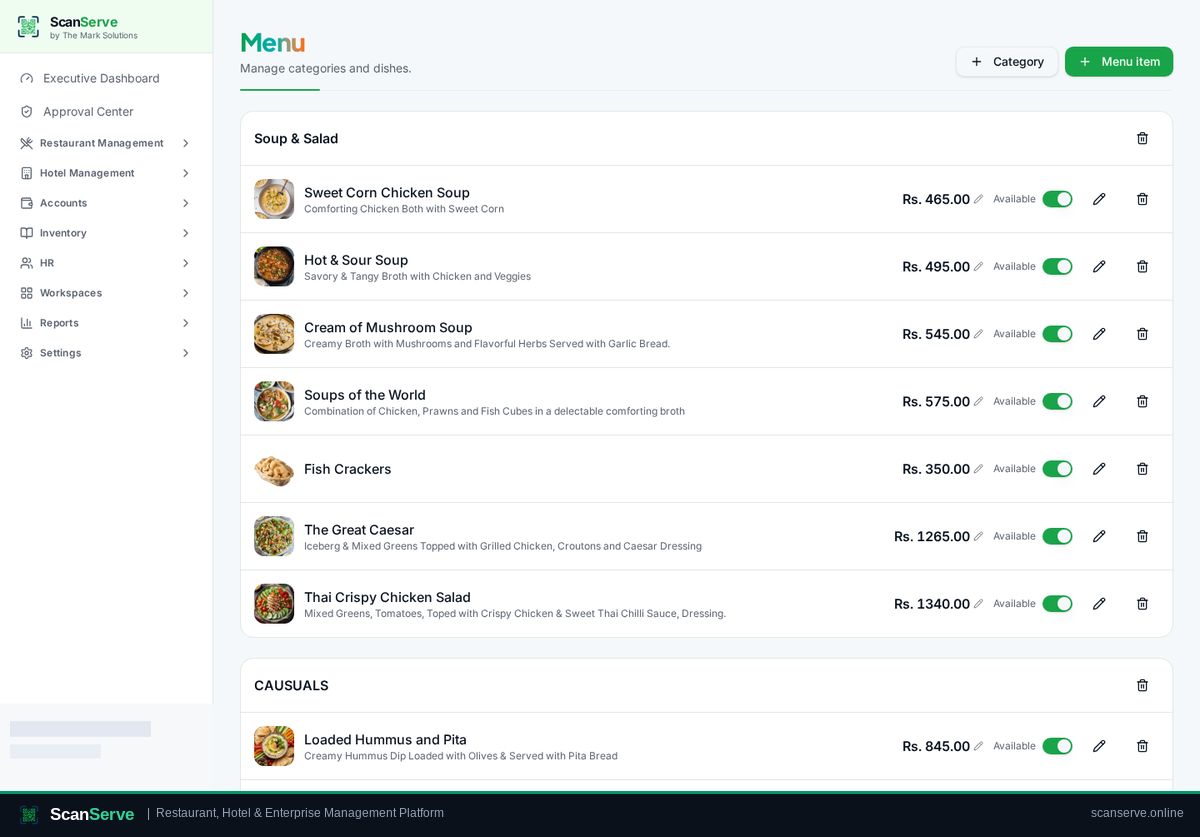
Build the menu once
Categories hold dishes; each dish carries a price, description, photo, variations and an availability switch.
- Categories and ordered dish lists
- Photos uploaded per dish
- Variations for sizes and options
- Instant availability toggle
QR cards you can actually put on tables
Tables & QR is a card workshop: pick a theme, add your logo, then print at A5, a custom size, or export a PDF for a print shop.
- A unique QR per table
- Four card themes with background images
- A5, custom size and PDF export
From scan to order
The scanned menu can be browse-only or full self-ordering, and the guest cart shows the total before confirming.
- Cart with running total
- Call waiter and request bill actions
- Order status page after ordering
Step-by-step guides
Frequently asked questions
- Do we reprint QR codes when the menu changes?
- No. The QR points at your live menu, so content changes need no new print.
- Can the menu be browse-only?
- Yes — you can use the QR menu for viewing and keep ordering with staff.
Related pages
See it running in your own venue
Start free, or open the interactive demo first.