
Owner executive dashboard with drill-down on every KPI
The executive dashboard is where an owner starts the day: today's sales, hotel occupancy, cash position, stock value, payroll cost and anything waiting for approval. Every card drills down, so a number that looks wrong can be traced to the records behind it in a couple of clicks.
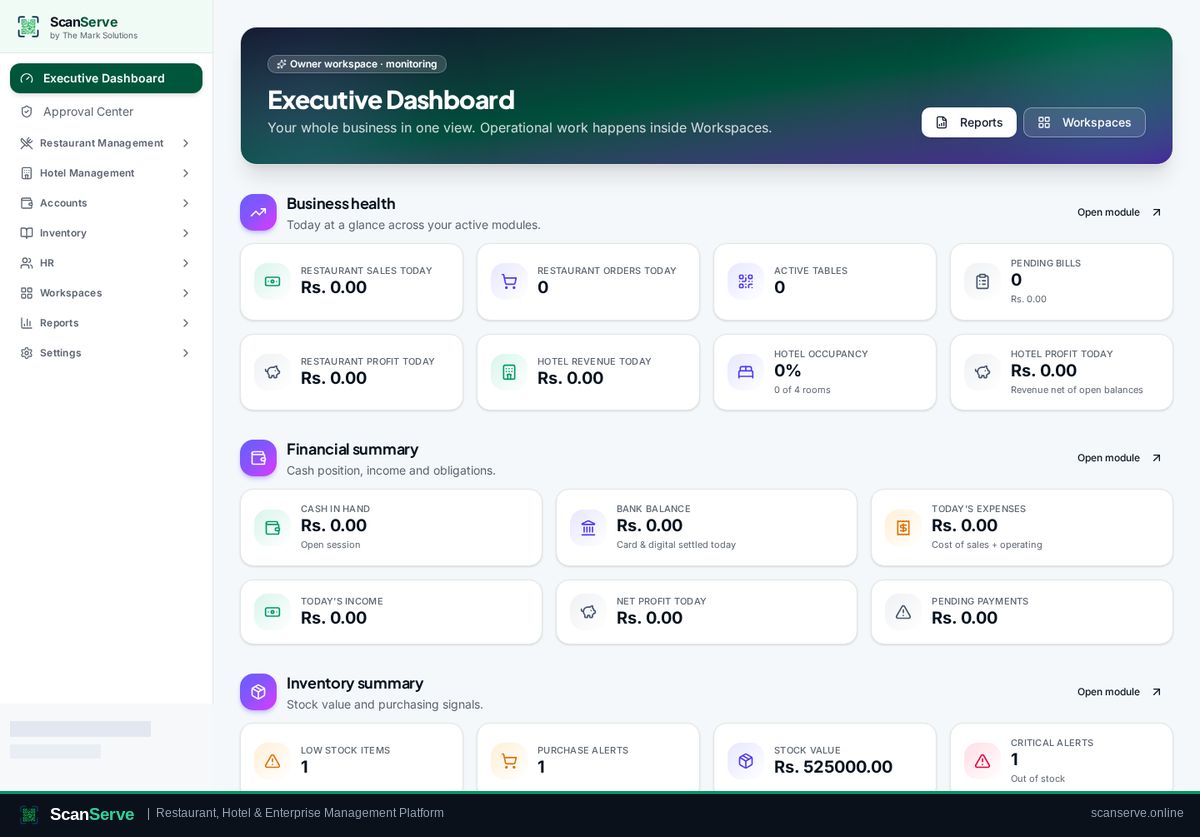
Cross-workspace KPIs
The dashboard pulls from restaurant, hotel, inventory, HR and finance instead of one module's view of the business.
- Sales, orders and average ticket
- Hotel occupancy, arrivals and departures
- Stock valuation and low-stock count
- Payroll cost and headcount
Drill-down instead of exports
KPI cards open the underlying list, filtered to the same period and scope as the figure.
- Card to record list drill-down
- Consistent period filters
- Branded report export from any view
Approvals in one place
Purchase requests, payments and staff requests queue in the Approval Center with badges in the sidebar.
- Pending approval badges
- Approve or reject with a reason
- Immutable decision history
Step-by-step guides
Frequently asked questions
- Can an owner open a staff workspace?
- Yes, with a visible override banner, and the action is recorded.
- Does the dashboard cover several venues?
- Yes, figures roll up across the organization.
Related pages
See it running in your own venue
Start free, or open the interactive demo first.